Site seems to be OK. Load issue should be resolved now.
If you can give it, or need it, post here
-
Mags
- Administrator
- Posts: 8848
- Joined: Fri Apr 13, 2018 9:40 pm
- Location: Tualatin Valley Oregon

Post
by Mags » Wed Mar 27, 2019 3:08 pm
.
resumed from:
http://henryrifleforums.com/viewtopic.p ... =20#p89458
.
back when it was free, I cloned my W7 desktop hard-drive and then did the free upgrade to W10 on the cloned drive. Now with a hard drive swap I can run either W7 or W10. The bi-annual W10 updates since the free days have made W10 much more user friendly. I'll soon stop using the W7 drive altogether. My laptop has been W10 from the beginning.
dave77 wrote:markiver54 wrote:BrokenolMarine wrote:I wasn't going to change but the computer died.
Yeh, I understand

that's exactly why Carol had to change.

Unfortunately,
"After 10 years of servicing, January 14, 2020, is the last day Microsoft will offer security updates for computers running Windows 7 SP1"
I should have got 10 when it was free, I understand you didn't have to install it right away. Looks like a OEM version is going to cost me around $100 or $150 for Pro.
-
dave77
- Drover
- Posts: 2323
- Joined: Mon Sep 25, 2017 12:09 am
- Location: Eastern Washington
Post
by dave77 » Wed Mar 27, 2019 3:41 pm
The main reason I didn't want to go to win 10 was the automatic updating of video drivers, I don't mind automatic updates of Windows but I want to decide when to update my video drivers and prefer to update them with Nvidia's updater. I understand there is now a workaround to prevent auto driver updates.
-
Mags
- Administrator
- Posts: 8848
- Joined: Fri Apr 13, 2018 9:40 pm
- Location: Tualatin Valley Oregon
Post
by Mags » Wed Mar 27, 2019 10:16 pm
.
Know the feeling, except for me it's the Realtek Wifi driver. Won't auto-connect to Wifi after the laptop is powered on. The Wifi driver that came with the laptop works fine, but then the auto driver update over writes it a few days after I roll the driver back to the original.
I have Nvidia on my desktop. I went through W10 updates a few weeks ago. I was surprised to see the Nvidia updater only update the Nvidia User Experience App. Saw the driver update would only come through the W10 updater. But then I have auto driver update enabled.
Anyway, here is how to prevent auto driver updates...
https://www.laptopmag.com/articles/disa ... windows-10
dave77 wrote:The main reason I didn't want to go to win 10 was the automatic updating of video drivers, I don't mind automatic updates of Windows but I want to decide when to update my video drivers and prefer to update them with Nvidia's updater. I understand there is now a workaround to prevent auto driver updates.
-
dave77
- Drover
- Posts: 2323
- Joined: Mon Sep 25, 2017 12:09 am
- Location: Eastern Washington
Post
by dave77 » Sun Sep 29, 2019 1:08 am
I guess I have to update to win10 before win7 support ends in January. Don't think I'll have any trouble with the install but there is one thing I can't seem to find a definitive answer to.
I will be installing win10 on my 256gb ssd. I have the My Photos, My Music and My Documents folders and some other stuff on a HDD. I have a few programs installed on the hdd but I can remove them and re-install them later but wondered if I plug in the hdd after installing win10 will it see the folders or will I have to reformat the hdd.
I do have everything on the hdd backed up to a usb hdd so maybe it would be better to move everything back to the hdd after moving the Win 10 My photos, etc. to the hdd. I do want to do a clean win10 install rather than a upgrade install.
-
Mags
- Administrator
- Posts: 8848
- Joined: Fri Apr 13, 2018 9:40 pm
- Location: Tualatin Valley Oregon
Post
by Mags » Sun Sep 29, 2019 11:58 am
.
Yes Win10 will see the folders. You might see some warning messages the first time you do it.
dave77 wrote: ↑Sun Sep 29, 2019 1:08 am
... wondered if I plug in the hdd after installing win10 will it see the folders ...
-
PT7
- Drover
- Posts: 4889
- Joined: Mon Mar 21, 2016 8:32 am
- Location: The Show-Me State
Post
by PT7 » Sun Sep 29, 2019 5:24 pm
Completely forgot about the
"Windows10: Yes or No" thread started on July 23, 2016. Just over three years after that discussion, I bought a Chromebook this last August 7, 2019. It runs on the ChromeOS system, and I no longer use any version of MS Windows. I will not go backwards now that I'm enjoying this new operating system.
The Lenovo PC I've been using before the Chromebook purchase had Windows10 running. I never liked Windows10, and constantly had challenges with it.
Now I can easily answer the subject question, ""Windows10:
Yes or No?"
It is a definite

NO
I really like my
Chromebook. It
shines for me!
~Пока~
-
Mags
- Administrator
- Posts: 8848
- Joined: Fri Apr 13, 2018 9:40 pm
- Location: Tualatin Valley Oregon
Post
by Mags » Sun Sep 29, 2019 6:35 pm
.
Ya the user experience with Chromebook is pretty nice. Hardware version of the Chrome browser.
Though we had a devil of a time performing regulatory testing on them. First up the Chromebook requires a network connection to be usable. Only software that runs on it, from the Google app store. That stopped us for few days until we figured out that ChromeOS is just a windowed version of Linux.
With some magic key presses we could abort the loading of ChromeOS and get to a Linux prompt that would then allow us to load our test suites.
PT7 wrote: ↑Sun Sep 29, 2019 5:24 pm
Completely forgot about the
"Windows10: Yes or No" thread started on July 23, 2016. Just over three years after that discussion, I bought a Chromebook this last August 7, 2019. It runs on the ChromeOS system, and I no longer use any version of MS Windows. I will not go backwards now that I'm enjoying this new operating system.
The Lenovo PC I've been using before the Chromebook purchase had Windows10 running. I never liked Windows10, and constantly had challenges with it.
Now I can easily answer the subject question, ""Windows10:
Yes or No?"
It is a definite
NO
I really like my
Chromebook. It
shines for me!
Last edited by
Mags on Sun Sep 29, 2019 10:37 pm, edited 1 time in total.
-
JEBar
- Town Marshal / Deputy Admin
- Posts: 20451
- Joined: Sun Mar 20, 2016 10:58 pm
- Location: central NC
Post
by JEBar » Sun Sep 29, 2019 8:31 pm
we still have the same computers using Windows 10 + updates that came on our computer .... all I can say is, it works
-
dave77
- Drover
- Posts: 2323
- Joined: Mon Sep 25, 2017 12:09 am
- Location: Eastern Washington
Post
by dave77 » Fri Oct 04, 2019 3:21 pm
Got Win10 installed and it's not as bad as I thought it would be. I had a short experience with Win 8 on a laptop I later sold and I hated it, probably why I was so hesitant to go to Win10. Win10 seems a lot more like Win7, just a lot of stuff is in different locations. I bought a new, larger SSD and did a clean install, Win 10 did see my folders and stuff on my 1Tb HDD when I hooked it up but I went ahead and reformatted it and moved most everything that was on it back on from my USB backup drive.
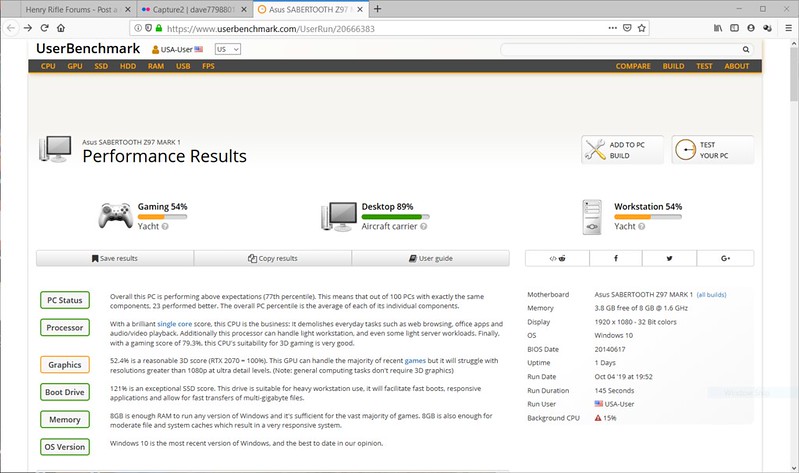
I tried using the new Performance Monitor (replaces the old Windows Experience app). I was concerned as it rated all my computer components at zero but I knew my computer couldn't be that bad so I checked at it userbenchmark.com and it scored quite well for a 5 year old computer. If I was to get back into high end gaming I would probably need a better graphic card but it's a great score for a desktop.
I'm getting rid of a lot of accumulated stuff I don't use and am going to try and use my folders more and keep my desktop a little less cluttered. As you can see I tend to put a lot of shortcuts and other stuff on it. That's an older photo, it was actually almost completely full.

-
Mags
- Administrator
- Posts: 8848
- Joined: Fri Apr 13, 2018 9:40 pm
- Location: Tualatin Valley Oregon
Post
by Mags » Fri Oct 04, 2019 3:32 pm
.
Happy to see you got it done and worked out.

dave77 wrote: ↑Fri Oct 04, 2019 3:21 pm
Got Win10 installed and it's not as bad as I thought it would be. I had a short experience with Win 8 on a laptop I later sold and I hated it, probably why I was so hesitant to go to Win10. Win10 seems a lot more like Win7, just a lot of stuff is in different locations. I bought a new, larger SSD and did a clean install, Win 10 did see my folders and stuff on my 1Tb HDD when I hooked it up but I went ahead and reformatted it and moved most everything that was on it back on from my USB backup drive.
I tried using the new Performance Monitor (replaces the old Windows Experience app). I was concerned as it rated all my computer components at zero but I knew my computer couldn't be that bad so I checked at it userbenchmark.com and it scored quite well for a 5 year old computer. If I was to get back into high end gaming I would probably need a better graphic card but it's a great score for a desktop.
I'm getting rid of a lot of accumulated stuff I don't use and am going to try and use my folders more and keep my desktop a little less cluttered. As you can see I tend to put a lot of shortcuts and other stuff on it. That's an older photo, it was actually almost completely full.
-
dave77
- Drover
- Posts: 2323
- Joined: Mon Sep 25, 2017 12:09 am
- Location: Eastern Washington
Post
by dave77 » Sat Oct 05, 2019 10:36 pm
Beginning to like win10, don't know how often I will use them but am finding more and more neat features that aren't in win7.
The search bar is definitely greatly improved, I was never that impressed with the win 7 search bar.
Just got done setting up my pop3 acct in the mail app and was surprised that all I had to enter was my pop 3 email address and apparently it was able to get all the other settings from the mail server. Had to manually enter them in Windows Live Mail.
I guess by waiting a couple of years they got a lot of the bugs out but it did cost me $140, could have got oem for $100 but I may build a new computer someday and will be able to move the full retail version to it.
-
Mags
- Administrator
- Posts: 8848
- Joined: Fri Apr 13, 2018 9:40 pm
- Location: Tualatin Valley Oregon
Post
by Mags » Sun Oct 06, 2019 12:21 am
.
Learned that too. Some of them you'll use and then if you ever visit Win7 and try to do them there, ya can't.
dave77 wrote: ↑Sat Oct 05, 2019 10:36 pm
... am finding more and more neat features that aren't in win7.
-
Travlin
- Cowboy
- Posts: 1537
- Joined: Mon Mar 21, 2016 1:06 am
Post
by Travlin » Thu Nov 21, 2019 12:34 am
Sorry guys but after having a Mac for a few years, I wiil never go back to a windows computer.
-
Mags
- Administrator
- Posts: 8848
- Joined: Fri Apr 13, 2018 9:40 pm
- Location: Tualatin Valley Oregon
Post
by Mags » Thu Nov 21, 2019 1:34 am
.
Few weeks ago my wife's girl friend brought her Macbook over for me to look at. She was having problems getting the charger to reliably connect to it (4 pins with magnetic grabber to hold the pins of the charger to the Macbook). She thought the computer was dead and wanted files recovered from the hard drive. Didn't need to do that. But I did backup her files. Mac Apps work great, as good as those now in Win10 and many of them more user intuitive and friendly. But navigating the Mac file system is gawd awful. The tools for that haven't changed all that much since the first modern Mac. Win10 is way ahead in file management tools.
-
BigAl52
- Forum Ambassador
- Posts: 15048
- Joined: Sun Oct 23, 2016 12:43 pm
- Location: Evans,Colorado
Post
by BigAl52 » Thu Nov 21, 2019 9:11 am
Id say thats because you dont use one all the time. I use windows and mac everyday. If you cant figure something out its on the world wide web. Agree with travelin. I will keep my mac and I will never have another Windows computer.
Don't let the old man in
H001T .22LR
H001T .22LR MONUMENT VALLEY
H003T PUMP .22LR
BBS .41 MAG
SS .357
SIDE GATE 38-55
-
JEBar
- Town Marshal / Deputy Admin
- Posts: 20451
- Joined: Sun Mar 20, 2016 10:58 pm
- Location: central NC
Post
by JEBar » Thu Nov 21, 2019 9:27 am
both of our laptops came with Windows 10 .... both have had a mechanical issues but no software ones .... we turn them on and they work ... we have no problems with Windows 10
-
markiver54
- Deputy Marshal
- Posts: 11157
- Joined: Sun Nov 04, 2018 11:49 am
- Location: Biue Ridge Mountains, NC
Post
by markiver54 » Thu Nov 21, 2019 11:00 am
My wife's latest laptop came with 10 and she did not like it at all. Because of her in home business she knows a computer Guru she calls when there is a problem. He was able to tweak some things so that it works like 7.
Yes, she pays well for his service, but he comes to the house and works his magic.
I'm your Huckleberry
-
Mags
- Administrator
- Posts: 8848
- Joined: Fri Apr 13, 2018 9:40 pm
- Location: Tualatin Valley Oregon
Post
by Mags » Thu Nov 21, 2019 9:20 pm
.
Yes that was required when Win10 first came out. Fortunately I had cloned our Win7 hard drives and then did the Win10 free upgrade on the clones. We stayed on Win7 until MS brought back deleted features and changed other defaults back until Win10 behaved more like Win7. Win10 has evolved since and the user experience now is even better than Win7.
markiver54 wrote: ↑Thu Nov 21, 2019 11:00 am
My wife's latest laptop came with 10 and she did not like it at all. Because of her in home business she knows a computer Guru she calls when there is a problem. He was able to tweak some things so that it works like 7.
Yes, she pays well for his service, but he comes to the house and works his magic.
-
Mags
- Administrator
- Posts: 8848
- Joined: Fri Apr 13, 2018 9:40 pm
- Location: Tualatin Valley Oregon
Post
by Mags » Thu Nov 21, 2019 9:22 pm
.
I use both enough to know how the file management tools work. And yes I did look stuff up on the web, because it was unbelievable to me how many steps were needed to do stuff in file management. In Windows most of what I need to do was bulk drag and drop of whole directories in a single motion. Not possible in IOS. Required multiple operations. Detailed example upon request.
BigAl52 wrote: ↑Thu Nov 21, 2019 9:11 am
Id say thats because you dont use one all the time. I use windows and mac everyday. If you cant figure something out its on the world wide web. Agree with travelin. I will keep my mac and I will never have another Windows computer.
-
BigAl52
- Forum Ambassador
- Posts: 15048
- Joined: Sun Oct 23, 2016 12:43 pm
- Location: Evans,Colorado
Post
by BigAl52 » Thu Nov 21, 2019 9:57 pm
Mags wrote: ↑Thu Nov 21, 2019 9:22 pm
.
I use both enough to know how the file management tools work. And yes I did look stuff up on the web, because it was unbelievable to me how many steps were needed to do stuff in file management. In Windows most of what I need to do was bulk drag and drop of whole directories in a single motion. Not possible in IOS. Required multiple operations. Detailed example upon request.
BigAl52 wrote: ↑Thu Nov 21, 2019 9:11 am
Id say thats because you dont use one all the time. I use windows and mac everyday. If you cant figure something out its on the world wide web. Agree with travelin. I will keep my mac and I will never have another Windows computer.
Im sure you know way more than I do Mags about computers. Just like you do everything else
Don't let the old man in
H001T .22LR
H001T .22LR MONUMENT VALLEY
H003T PUMP .22LR
BBS .41 MAG
SS .357
SIDE GATE 38-55