Page 1 of 2
Can’t Stay Logged In
Posted: Sat Oct 27, 2018 9:49 pm
by Sir Henry
I am still having problems logging in. Or should I say staying logged in. I stay logged in on another forum but not here. After checking settings I get the boot on the other forum now also.
I would like to post more but logging in on a cell phone isn’t easy. Any ideas?
Re: Can’t Stay Logged In
Posted: Sat Oct 27, 2018 9:59 pm
by RanchRoper
I don't have any issues on a Samsung Galaxy. Seems ok except for when it blows up.

Re: Can’t Stay Logged In
Posted: Sat Oct 27, 2018 10:04 pm
by Mags
.
My experience with this forum is that I get logged out automatically after too long a period of inactivity. I've always thought that normal behavior. I have a Samsung cell phone. The web browser on it is Chrome. Login is the same experience as from my PC.
What brand of cell phone do you have and what steps do you go through on your cell phone to login?
Sir Henry wrote:I am still having problems logging in. Or should I say staying logged in. I stay logged in on another forum but not here. After checking settings I get the boot on the other forum now also.
I would like to post more but logging in on a cell phone isn’t easy. Any ideas?
Re: Can’t Stay Logged In
Posted: Sat Oct 27, 2018 10:24 pm
by BigAl52
Its probably Daves fault.

Re: Can’t Stay Logged In
Posted: Sun Oct 28, 2018 10:17 am
by Sir Henry
I have an Apple but don’t think it is the phone because I can stay logged in on two other forums. Right now my internet is down on my laptop which I also use to get online and on the forum. It is not as convenient as my cell and I find myself posting elsewhere.
I’m ready to get back to shooting and would like to post about it.
Re: Can’t Stay Logged In
Posted: Sun Oct 28, 2018 10:21 am
by JEBar
each time I turn on my computer, this forum is one of the sites that it automatically logs into .... most of the time it works like a charm .... that said, each week (sometimes more than once) I have to manually sign in .... the remember me box is checked and as noted works most of the time .... no clue why it works this way ... as a side note, I spend a good deal of time logged in so inactivity isn't an issue for me ... over time, Dave has addressed this issue and so far as I know hasn't found the cause
Re: Can’t Stay Logged In
Posted: Sun Oct 28, 2018 10:31 am
by CT_Shooter
SH, it could be a cookie setting. I did a little research, though I don't use Apple products, so I can't check it out for you.
When using Safari, make sure your Block Cookies setting is set to Allow (cookies). This setting can be found in Settings -> Safari. Also, make sure your browser is not set to Private; I've read that this will also log you out.
Re: Can’t Stay Logged In
Posted: Sun Oct 28, 2018 11:09 am
by Sir Henry
CT_Shooter wrote:SH, it could be a cookie setting. I did a little research, though I don't use Apple products, so I can't check it out for you.
When using Safari, make sure your Block Cookies setting is set to Allow (cookies). This setting can be found in Settings -> Safari. Also, make sure your browser is not set to Private; I've read that this will also log you out.
If it was a cookie problem wouldn’t it be the same for all forums and websites? This forum is the only one where I am having problems.
Re: Can’t Stay Logged In
Posted: Sun Oct 28, 2018 11:36 am
by CT_Shooter
Sir Henry wrote:
If it was a cookie problem wouldn’t it be the same for all forums and websites? This forum is the only one where I am having problems.
Not necessarily. Safari has several levels of cookie settings
iOS Tip wrote:
You can block Safari cookies on iOS by going into Settings > Safari > Privacy & Security section. There are four options to choose from: Always Block, Allow from Current Website Only, Allow from Websites I Visit, and Always Allow.
https://www.macobserver.com/tips/quick- ... i-cookies/
Re: Can’t Stay Logged In
Posted: Sun Oct 28, 2018 11:46 am
by Redthies
This is the only forum I get kicked out of too. It happens at very irregular intervals. Hasn’t happened for about 10 days, and then I got kicked out last night. I’m using a current iPad and an iPhone 6s.
Re: Can’t Stay Logged In
Posted: Sun Oct 28, 2018 12:08 pm
by Sir Henry
This is what my settings are currently.
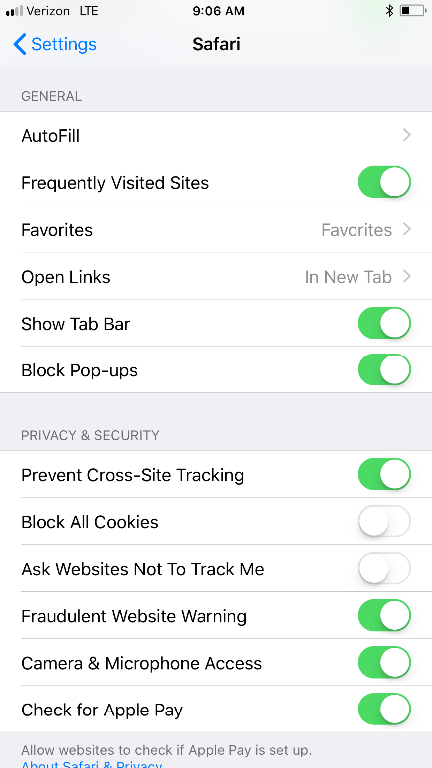
- 346D3E3B-64E3-4495-B6CC-CDC1CDE94834.png (80.25 KiB) Viewed 2205 times
Re: Can’t Stay Logged In
Posted: Sun Oct 28, 2018 12:15 pm
by BigAl52
I run a mac Gene. It kicks me out once in a while but not often. Not sure what you're issue might be. Maybe try another browser Gene. Im using Google Chrome on mine and not Safari. Al
Re: Can’t Stay Logged In
Posted: Sun Oct 28, 2018 12:17 pm
by CT_Shooter
Sir Henry wrote:This is what my settings are currently.
Well, I tried to help, but I've never been an Apple user, so I guess I couldn't. Maybe we'll hear from someone who actually knows. BTW, I have Windows 7 on both my laptop and desktop computers and use Google Chrome. I never get logged out of this forum and I'm always automatically logged in. Different worlds. Wish I could have helped.
Re: Can’t Stay Logged In
Posted: Sun Oct 28, 2018 12:33 pm
by Mags
.
For paranoia security reasons I don't use any of the 'remember me' setting offered by any website. My browser setting is to delete everything on exit. I don't want another website harvesting login information cookies, form data or anything else from other websites (for example yahoo harvesting amazon or my bank).
CT_Shooter wrote:Sir Henry wrote:
If it was a cookie problem wouldn’t it be the same for all forums and websites? This forum is the only one where I am having problems.
Not necessarily. Safari has several levels of cookie settings
iOS Tip wrote:
You can block Safari cookies on iOS by going into Settings > Safari > Privacy & Security section. There are four options to choose from: Always Block, Allow from Current Website Only, Allow from Websites I Visit, and Always Allow.
https://www.macobserver.com/tips/quick- ... i-cookies/
Re: Can’t Stay Logged In
Posted: Sun Oct 28, 2018 1:26 pm
by Sir Henry
Mags wrote:.
For paranoia security reasons I don't use any of the 'remember me' setting offered by any website. My browser setting is to delete everything on exit. I don't want another website harvesting login information cookies, form data or anything else from other websites (for example yahoo harvesting amazon or my bank).
CT_Shooter wrote:Sir Henry wrote:
If it was a cookie problem wouldn’t it be the same for all forums and websites? This forum is the only one where I am having problems.
Not necessarily. Safari has several levels of cookie settings
iOS Tip wrote:
You can block Safari cookies on iOS by going into Settings > Safari > Privacy & Security section. There are four options to choose from: Always Block, Allow from Current Website Only, Allow from Websites I Visit, and Always Allow.
https://www.macobserver.com/tips/quick- ... i-cookies/
It is to time consuming to log in every post.
Re: Can’t Stay Logged In
Posted: Sun Oct 28, 2018 2:55 pm
by Sir Henry
I may have found the problem. I went to Settings, App & Website Passwords, Add Password and filled it in there. I think they do this so you can turn cookies off. Instead of the website remembering you the phone remembers the website.
Re: Can’t Stay Logged In
Posted: Sun Oct 28, 2018 4:24 pm
by Mags
.
Not logging in with every 'post'. I login per website visit. I can read and post to as many topics as I choose to during the visit. And I intentionally logout when I leave (unless I forget, which sometimes happens).
Anyway, looks like you found your your solution. Congrats on that.
Sir Henry wrote:Mags wrote:.
For paranoia security reasons I don't use any of the 'remember me' setting offered by any website. My browser setting is to delete everything on exit. I don't want another website harvesting login information cookies, form data or anything else from other websites (for example yahoo harvesting amazon or my bank).
CT_Shooter wrote:
Not necessarily. Safari has several levels of cookie settings
It is to time consuming to log in every post.
Re: Can’t Stay Logged In
Posted: Sun Oct 28, 2018 4:46 pm
by Sir Henry
Mags wrote:.
Not logging in with every 'post'. I login per website visit. I can read and post to as many topics as I choose to during the visit. And I intentionally logout when I leave (unless I forget, which sometimes happens).
Anyway, looks like you found your your solution. Congrats on that.
Sir Henry wrote:Mags wrote:.
For paranoia security reasons I don't use any of the 'remember me' setting offered by any website. My browser setting is to delete everything on exit. I don't want another website harvesting login information cookies, form data or anything else from other websites (for example yahoo harvesting amazon or my bank).
It is to time consuming to log in every post.
If I posted right away I could but if the screen safer was activated or I went to any other site it logged me out. My cell phone is now working and this post if from my laptop.
Re: Can’t Stay Logged In
Posted: Mon Oct 29, 2018 11:28 am
by Sir Henry
I tried logging in on my cell phone last night and couldn't even with the correct password. This is being posted from my laptop. I was planning on going to the range just so I could post something besides not being able to log in. I'm going to try on the cell phone one more time this morning before changing passwords again and if I succeed I'll head to the range.
Re: Can’t Stay Logged In
Posted: Tue Nov 27, 2018 6:02 pm
by Sir Henry
I think I may have solved my problem. At times I was getting logged out between posts.